

109 lines
5.3 KiB
Markdown
109 lines
5.3 KiB
Markdown
<h1 align=center>Hugo Scroll 📜 <a href="https://zjedi.github.io/hugo-scroll/" rel="nofollow">Demo</a></h1>
|
|
|
|
Clean, responsive, single-page [Hugo](https://gohugo.io/) website theme.
|
|
|
|
[](https://themes.gohugo.io/themes/hugo-scroll/)
|
|

|
|
[](https://app.netlify.com/sites/hugo-scroll/deploys)
|
|
[](https://github.com/zjedi/hugo-scroll/blob/master/LICENSE)
|
|

|
|
|
|
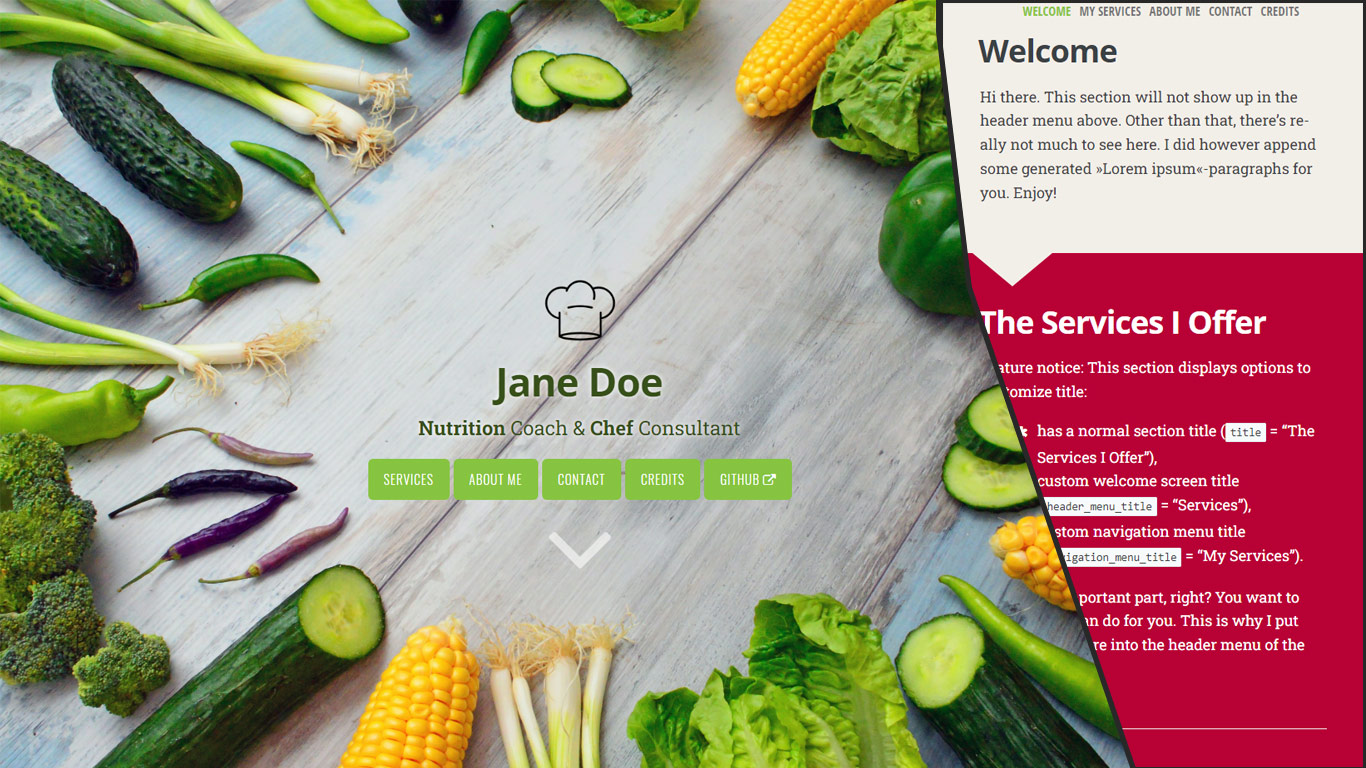
Promo image which may be a bit outdated:<br/>
|
|
|
|
|
|
## ⭐ Feature highlights
|
|
- Responsive to screen size/shape
|
|
- SEO friendly
|
|
- Customizable
|
|
- Video cover
|
|
- [Fork Awesome Icons][fork-awesome-icons] out of the box
|
|
- Header logo
|
|
- Visual guards to guarantee readability
|
|
- External links
|
|
- JS/CSS Assets optimized (Minification, Fingerpriting, pipeline-processed
|
|
into single file)
|
|
- git info in footer (opt-in)
|
|
|
|
## 🔑 Installation
|
|
If you already have a Hugo site on your machine, you can simply add this theme via
|
|
```
|
|
git submodule add https://github.com/zjedi/hugo-scroll.git themes/hugo-scroll
|
|
```
|
|
Then, adjust the `config.toml` as detailed below & in the file comments.
|
|
|
|
### Playing around with our example site
|
|
|
|
If you simply want to check out the `exampleSite`, you can run
|
|
```
|
|
git clone https://github.com/zjedi/hugo-scroll.git hugo-scroll
|
|
cd hugo-scroll
|
|
hugo server --source=exampleSite --themesDir=../..
|
|
```
|
|
|
|
For more information, read the official [Hugo setup guide][hugo-setup-guide].
|
|
|
|
If you are starting fresh, simply copy over the contents of the `exampleSite`-directory included in this theme to your source directory. That should give you a good idea about how things work, and then you can go on from there to make the site your own.
|
|
|
|
Please check out the [config.toml](https://github.com/zjedi/hugo-scroll/blob/master/exampleSite/config.toml) included in the [exampleSite](https://github.com/zjedi/hugo-scroll/tree/master/exampleSite) of this theme.
|
|
|
|
You can add **a new section to the homepage** by running `hugo new homepage/my-new-content.md` (or craft the file manually)
|
|
|
|
To create **a page separate from the homepage**, run `hugo new my-new-page.md`
|
|
|
|
|
|
## 🔧 Feature details 🔨
|
|
|
|
### Customizing CSS
|
|
Add a [`custom_head.html`](https://github.com/zjedi/hugo-scroll/blob/master/exampleSite/layouts/partials/custom_head.html) file to your `layouts/partials` directory.
|
|
- You can use `<style>` tag to embed the overrides (better performance-wise)
|
|
- Alternatively you can `<link>` your own `custom.css`
|
|
|
|
`CSS` variables `var(--some-var-name)` from `assets\css\variables.scss` can be overridden by adding
|
|
```scss
|
|
:root {
|
|
--some-var-name: blue!important;
|
|
}
|
|
```
|
|
### Icons
|
|
This theme includes the full set of [Fork Awesome 1.2.0 Icons][fork-awesome-icons]. Use the `{{<icon>}}`-[shortcode][hugo-shortcodes] with the respective "fa fa-ICONNAME"-`class` to use an icon directly in your `.markdown` files à la
|
|
```markdown
|
|
Look at this nice »envelope«-icon: `{{<icon class="fa fa-envelope">}}`. I took this from https://forkaweso.me/Fork-Awesome/icon/envelope/ :-)
|
|
```
|
|
### Header logo
|
|
Configured in `_index.md`, see `exampleSite`: `header_logo: "images/chef-hat.png"`
|
|
|
|
### Video cover
|
|
Set `header_use_video: true` in `/exampleSite/content/_index.md` and define video source via custom partial, such as `exampleSite/layouts/partials/custom_header_video.html`.
|
|
|
|
### Footer version information
|
|
In order to see technical version information (extracted from Hugo's [GitInfo](https://gohugo.io/variables/git/))) set the following general option in your config.toml: `enableGitInfo = true`
|
|
|
|
### External links
|
|
You can add an external link in the menu, see `external.md` in the `exampleSite`.
|
|
|
|
You can also use `extlink` shortcode to create a link opening in a new tab:
|
|
```markdown
|
|
Visit as at {{<extlink text="Instagram" href="https://www.instagram.com/yourInstagramName/">}}
|
|
```
|
|
Referencing and showing icons in front of the link text is possible with a new parameter `icon`:
|
|
```markdown
|
|
Visit as at {{<extlink icon="fa fa-instagram" text="Instagram" href="https://www.instagram.com/yourInstagramName/">}}
|
|
```
|
|
|
|
## 🐛 Issues / 💡 Feedback / 👑 Contributing
|
|
[Discussion](https://github.com/zjedi/hugo-scroll/discussions) for Q&A (when unsure),
|
|
[Issues](https://github.com/zjedi/hugo-scroll/issues) for tracking,
|
|
[Pull Requests](https://github.com/zjedi/hugo-scroll/pulls) for contributions.
|
|
|
|
|
|
See [contributing guideline](https://github.com/zjedi/hugo-scroll/blob/master/contributing.md) for more.
|
|
|
|
## 👏 Special Thanks
|
|
- [Jan Raasch](https://www.janraasch.com), original author of theme
|
|
- [Yonatan Wolowelsky](https://github.com/grmmph), author of [GhostScroll](https://github.com/grmmph/GhostScroll) theme, which formed the basis of this [Hugo](https://gohugo.io/) theme.
|
|
- [Pexels](https://www.pexels.com), for supplying _free_ stock photos.
|
|
|
|
|
|
[hugo-setup-guide]: https://gohugo.io/getting-started/installing
|
|
[fork-awesome-icons]: https://forkaweso.me/Fork-Awesome/icons/
|
|
[hugo-shortcodes]: https://gohugo.io/content-management/shortcodes/
|